
Backup and Disaster Recovery: The Basics of Data Protection

No disaster recovery plan is complete without specific information about your company’s data backups.
Creating copies of your data and storing them in separate locations or mediums can help protect it against loss, deletion, corruption or hardware failures, which is why backup and disaster recovery work hand-in-hand.
But what information should you back up? And how often? And where?
Here’s what every organization needs to know about backup and disaster recovery.
How Does Data Backup Fit Into Your Overall Disaster Recovery Plan?
There’s more to a disaster recovery plan than backups alone, but you can’t have a successful disaster recovery plan without backups. The ability to preserve and restore data is essential if you need to maintain operations and minimize downtime after a disruptive event.
In the event of a disaster, data backup will be critical for achieving your recovery point objective (RPO), which determines the acceptable amount of data loss during recovery. You can set backup frequency and granularity to align with your RPO requirements and support your overall disaster recovery plan.
Your disaster recovery plan should include detailed documentation about backups and ensure any regulatory compliance requirements are met. It should be scalable so you can adapt as your organization’s data needs and technical infrastructure environment change.
So, while backup and disaster recovery are two different technology topics, they’re both essential for responding well to disruptions to your systems.
What Types of Backups Would a Robust Disaster Recovery Plan Use?
A good disaster recovery plan should allow multiple backup mediums and storage locations (with at least one off-site copy).
There are several different types of backups available. The one you select for your company’s disaster recovery plan should reflect your specific objectives:
- Full backups copy all of your data to a storage medium.
- Incremental backups capture changes made since the last backup of any kind.
- Differential backups capture changes made since the last full backup.
- Continuous data protection (CDP) captures every change made to your data at a granular level.
You can also store your data in different mediums:
- Disk-based backups store information on hard disk drives or network-attached storage (NAS) devices.
- Replication technologies create real-time or periodic copies of data and maintain them on separate storage systems or at remote locations.
- Cloud-based backup solutions store information on remote cloud platforms.
- Snapshot-based backups capture the state of the data at a particular time and allow restoration to that state.
If you aren’t sure which option is best for your organization, your IT advisor can make recommendations based on your unique needs.

What Data Should You Back Up as Part of Your Disaster Recovery Plan?
Today’s businesses deal with vast amounts of data through day-to-day activities, making it difficult to know what needs to be backed up. At a minimum, consider having backups of this information in your disaster recovery plan:
- Business-critical data (customer information, financial records, sales and transaction data, inventory and supply chain data, product databases, etc.)
- System configurations and settings (operating system and network configurations, firewall rules, user account settings, etc.)
- Application data (databases, application files, user profiles, application-specific configurations, etc.)
- User data (documents, spreadsheets, emails, project files, customer files and other employee-generated data)
- System images or server snapshots of the entire system state
- Virtual Machines (VMs), including all VM configurations, disk images and associated data
- Log files and audit trails with records of system activities, security events and user actions
How Should a Business Backup Data Within Its Disaster Recovery Plan?
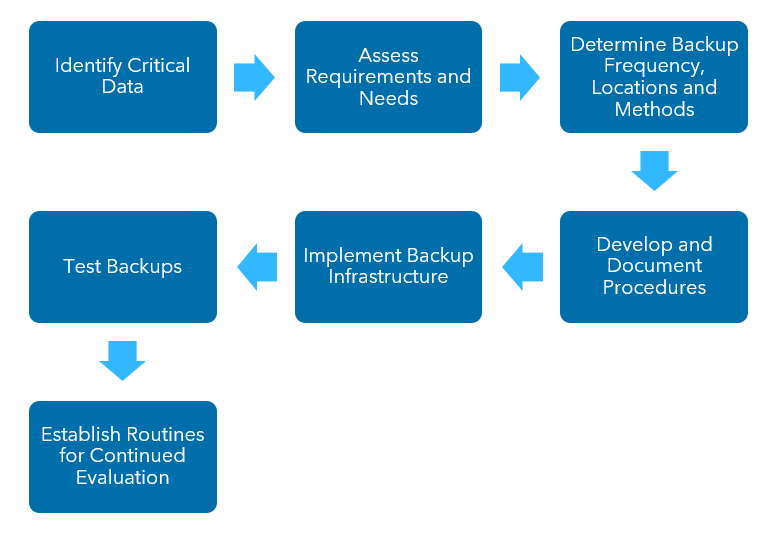
If you aren’t sure where to begin with your company’s backup and disaster recovery, start by making a list of all your company’s digital assets and identifying which data is essential.
Considering this list, identify any data protection requirements your company may be subject to—including data privacy requirements—but also identify your company’s data accessibility, longevity and security needs in relation to your assets.
Next, decide how often you should create backups based on how much data you can afford to lose, and choose the correct methods, technologies and places to store those backups. Don’t forget to document your processes and formally incorporate this information into your disaster recovery plan. Then, you’ll be ready to implement your backup infrastructure.
Test your backups and evaluate them periodically to ensure they work and stay in good shape.
How Should Backups Be Tested for Recoverability?
Testing your backups is critical—it’s the only way to be sure that this aspect of your disaster recovery plan is effective.
To test your backups, you’ll first need to determine example situations and information to conduct the tests. Then, set up a controlled testing environment and conduct tests to see if the data you restore from your backups matches the outcomes outlined in your disaster recovery plan. You’ll also want to ensure that the intended users and applications can access the information as intended.
Be sure to keep a record of the test results and plan regular testing sessions to guarantee that your backup process functions correctly.
Learn More about Backup and Disaster Recovery for Your Company
Data backup is a critical component of an effective disaster recovery plan. Ready to implement a comprehensive data backup strategy? Warren Averett Technology Group can help you design and execute a business continuity and data recovery plan to meet your IT objectives and compliance requirements. Get in touch to start the conversation with a business continuity expert.
